At a Glance
My company is a video platform for on-demand and live streaming. Over one year, we partnered with Bonnier to give Di.se, Sweden's biggest business publication, a quarterly report video product it didn't have. I designed four products (video meeting software for producers, an embedded player for viewers, a form and email system, and embeddable video channels for company investor pages) plus three components integrated into di.se.
Since launch, roughly fifteen listed companies have joined, thirty-five videos are live, and companies using the pipeline report visibility gains of up to 700 percent over previous solutions.
Context
Bonnier owns Di.se, the leading business and financial newspaper in Sweden. Quarterly report coverage there had always lived as numbers, graphs, and links to PDFs. Readers who wanted more context assembled it themselves from press releases and analyst notes.
A Finnish competitor had already built the product Di.se didn't have: video interviews with CEOs and CFOs at earnings time, watchable presentations instead of downloadable ones. Their format was setting the standard across the Nordics, and Di.se had no answer to it.
The problem
The pitch we brought to Bonnier was direct. Sweden's biggest business paper was missing its opportunity to be the leading publisher of quarterly report videos, and the space was being taken by a Finnish competitor while di.se stayed with static formats. We offered to help them close the gap.
Bonnier said yes. That meant we had to build several things at once.
Public companies needed a way to actually broadcast a professional quarterly report. This meant supporting several roles live: the CEO and CFO speaking, the operator running the stream, invited experts and shareholders asking questions, phone-in callers, and thousands of viewers watching from di.se's audience.
Participating companies also needed a way to publish these videos on their own investor pages. My company had a product for building customer video channels, but it hadn't been designed for a pipeline like this.
We also had to build the infrastructure for sign-ups and confirmation emails. Two different flows for the two audiences (viewers and participants), all customizable per company. That infrastructure didn't exist.
And we had to design the di.se side of the pipeline: where the streams appear live, where they live afterward, how readers find them, and how they integrate with di.se's existing coverage. All of it had to look native to di.se.
The deadline was April 2026, one year from the first meeting.
What We Had to Work Around
- Bonnier's UX and dev teams didn't join until nine months into the project
- No access to di.se's design system
- A one-year deadline with no room for slippage
- No existing infrastructure on our side for webcam streams, sign-ups, forms, or emails
Decisions
Unlike most partnerships, this one didn't start with a client brief. Bonnier wasn't a customer. We identified the gap ourselves, studied what the Finnish competitor had built, and pitched Bonnier on closing it. When they said yes, we had committed to a year of design, engineering, and integration work with a partner we'd never worked with before, on a product that didn't yet exist.
Decision 01
Five roles, five access points
The Question
How do we spread the work of running a live broadcast across the right people, so speakers can focus on speaking and guests can join without breaking anything?
What We Chose and Why
Other meeting platforms like Teams and Zoom treat every participant as roughly the same kind of user. A professional quarterly report broadcast doesn't work that way. We designed the software around five distinct roles, each with different capabilities and different entry paths.
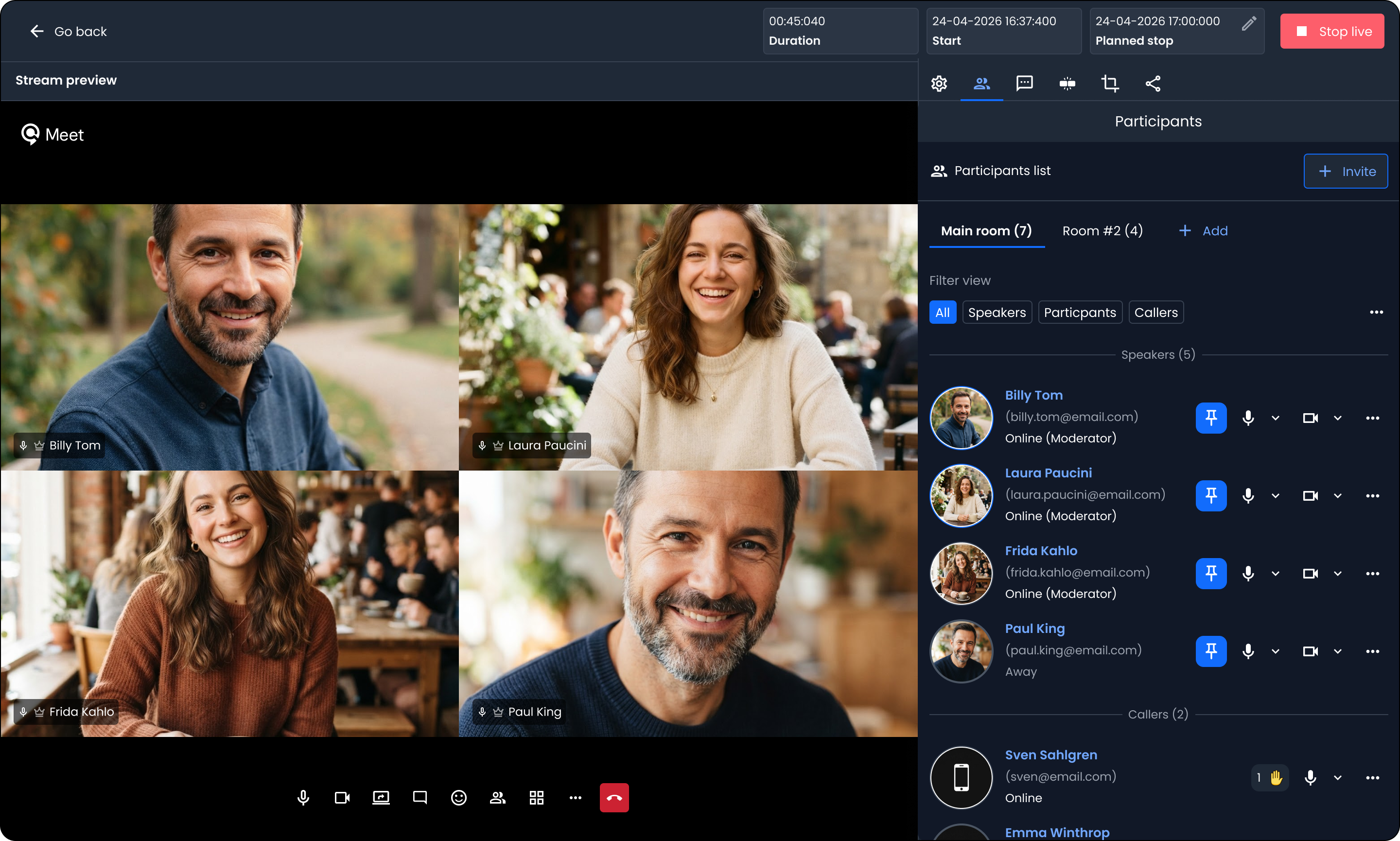
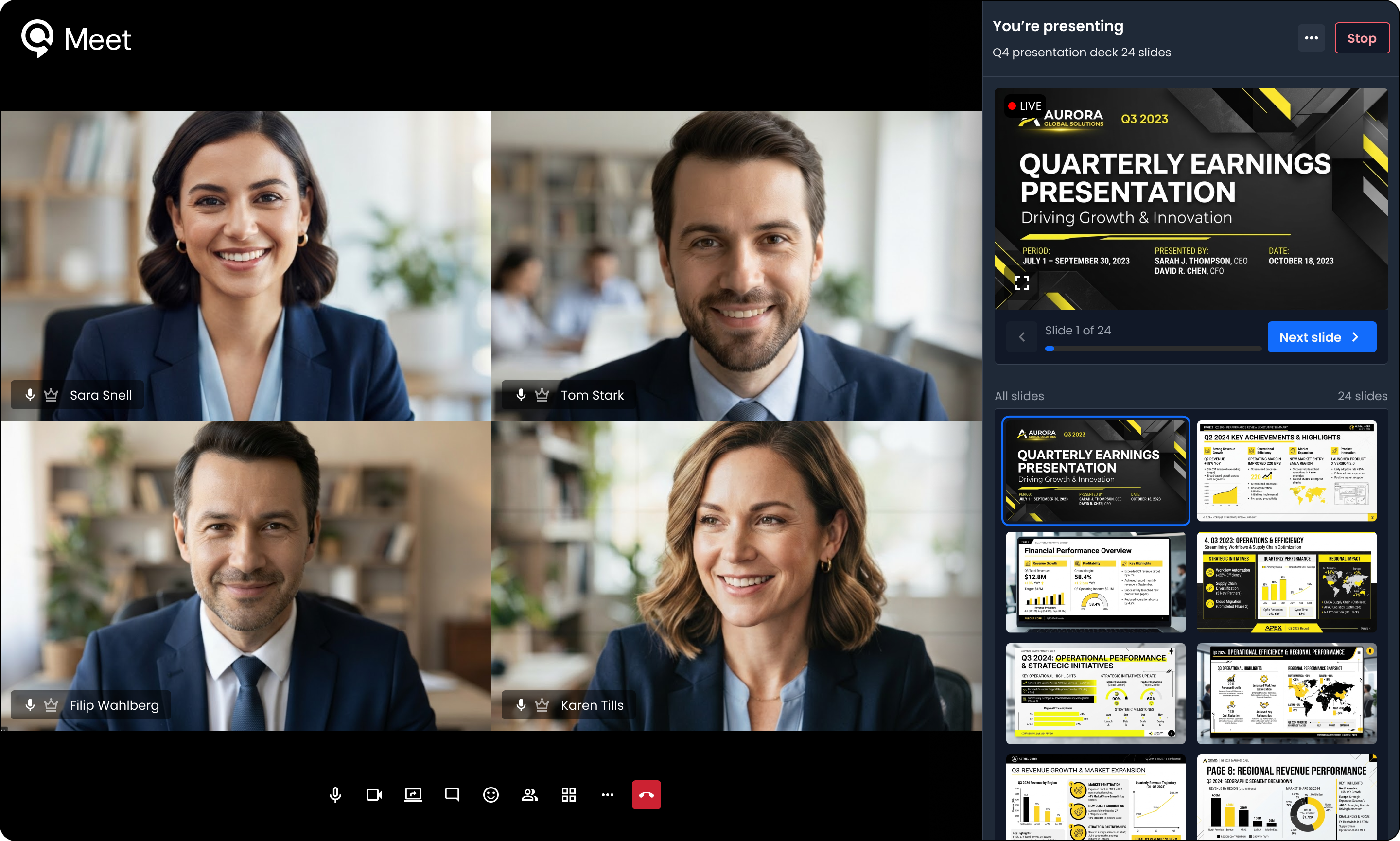
Operators run the broadcast. They manage the stream, upload the presentation, invite participants, control who speaks and when, change slides, moderate chat, and set metadata.
Speakers are the CEO, CFO, and other primary voices. They present and answer questions.
Participants are invited experts and selected shareholders who ask questions live.
Callers have the same purpose as participants, but join by phone rather than by browser. This required building phone integration into a browser-based streaming tool.
Viewers watch through the embedded player on di.se. They can chat with each other but never touch the meeting software.
Each role has its own sign-up flow, email sendout, and permissions. The design work was making sure five people in five different interfaces converge on one broadcast.
Participants list in the live management tool.
Decision 02
Designing the pipeline as a single flow across four products
The Question
How do we design new products that combine with our existing platform to form one coherent flow?
What We Chose and Why
My company already had an embeddable video player and a product for building customer video channels. The possibility to view slides in the video player, a video meeting software and the form and email system had to be built new. All four products had to work together as one pipeline for our customers.
The design work was mostly in the seams. Where the meeting software's stream flows into the player. Where the form's sign-up grants access to the player or an invitation to the meeting software. Where the player embeds into either di.se or the video channels. Each product needed a clean interface to the next, so that from the user's point of view this was one flow, not four separate tools.
Assets from both platforms merge to create one singular experience.
Decision 03
A different way in for each role
The Question
How do we invite different types of viewers/participants into the same broadcast?
What We Chose and Why
Each of the five roles has different context, so each gets a different invitation.
Speakers (CEOs, CFOs, primary voices) are added by the operator in the admin section of the meeting software and receive a direct link to the meeting.
Participants receive a form from the operator by email. They fill it out and receive their invitation.
Callers use the same form as participants, but their invitation email includes a phone number to dial at broadcast time. From the software's point of view, a caller is a participant who joins by phone.
Viewers sign up through the form shown alongside the video wherever it's embedded (on di.se, on a company's investor page, or elsewhere). Their sign-up grants access to the player.
Four invitation mechanisms, but on the operator's side, everyone shows up in the same participant list, tagged by role. That's what keeps the broadcast manageable.
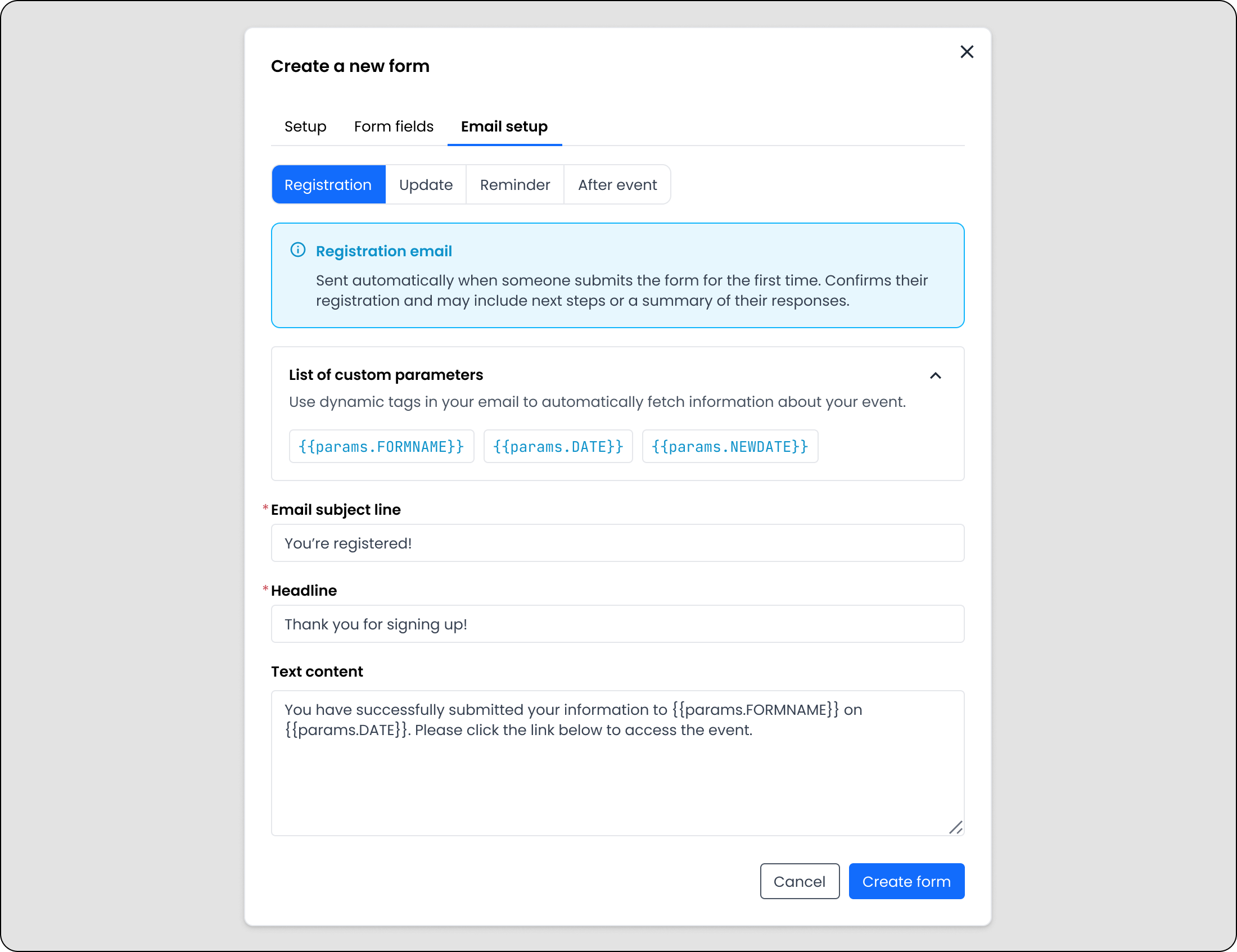
Invitation form that triggers an email invite.
Decision 04
Two brands, one pipeline
The Question
How do I design a pipeline where some products should look like my company's platform, while others should look like the client's?
What We Chose and Why
Different parts of the pipeline needed to feel like different brands.
The products used by producers and operators (the video meeting software, the form builder, the admin tools) live on my company's platform, so they needed to look like our platform.
The products seen by Di.se readers and the participating companies' audiences (the embedded player, the embeddable video channels, the three Di.se widgets) needed to look like Di.se. A reader should never notice that my company's tools are powering the video experience.
The embeddable video channels sat in the middle. They needed to feel like Di.se's aesthetic and also accept each customer's own brand: logo, accent colors, and small stylistic touches. I redesigned that product in two layers. The structural layer (grid, hierarchy, video component shapes, information density) locked to the Di.se aesthetic. The visual layer stayed customizable.
On the Di.se side, there was an added constraint. Bonnier's UX team didn't join until nine months into a twelve-month project. Until then, I worked from what I could see on the live site: typefaces, spacing, colors, patterns. I studied it and rebuilt it component by component in my own files. When the Bonnier team joined, they translated my designs into their own system. The finished components match my designs at about 95 percent.
Two platforms needing separate visual languages.
The shipped solution
The pipeline launched in April 2026 and now runs across five connected surfaces.
Video meeting software (built for this project). Producers use it to run the live broadcast. Operators upload the presentation, invite speakers by web link, invite callers by phone, control slides, moderate chat, and set metadata.
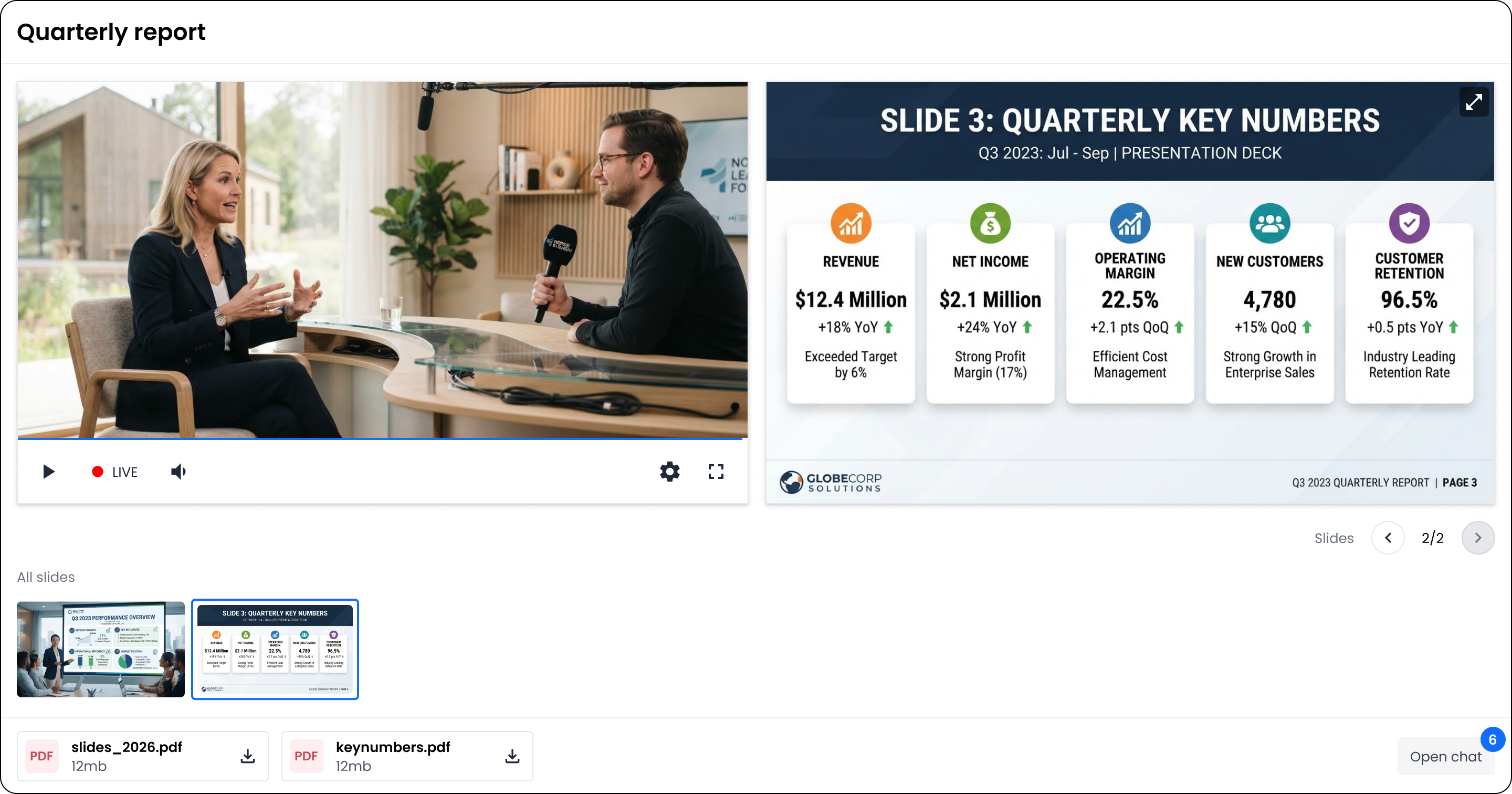
Embedded video player (existing product with added features). The stream flows out of the meeting software and into the player, which appears on Di.se, on customer investor pages, and anywhere else a customer chooses to display it. Presentation slides are viewable during and after a live stream within the video player.
Form and email system (built for this project). Any live stream can have a form attached. Viewer sign-ups grant access to the player. Participant sign-ups grant entry to the meeting software. Each triggers a customizable confirmation email.
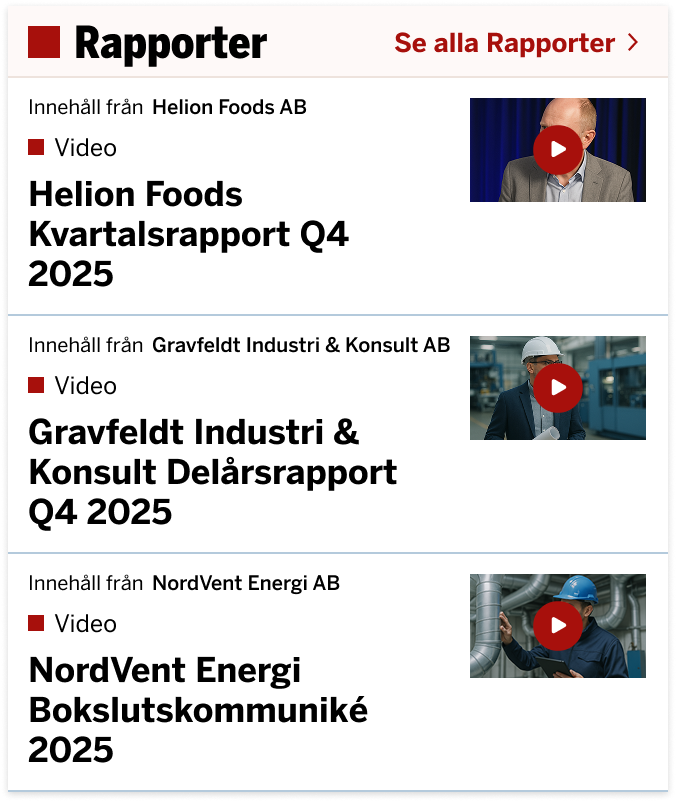
Embeddable video channels (existing product, redesigned). Participating companies display their quarterly report videos on their own investor pages, styled to match the wider pipeline but flexible enough to hold each customer's brand.
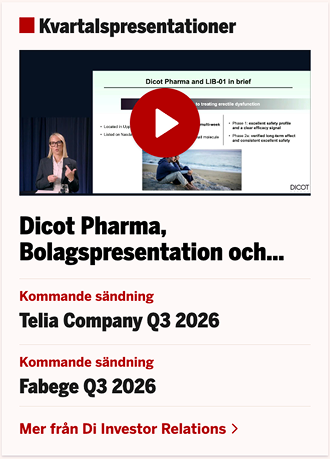
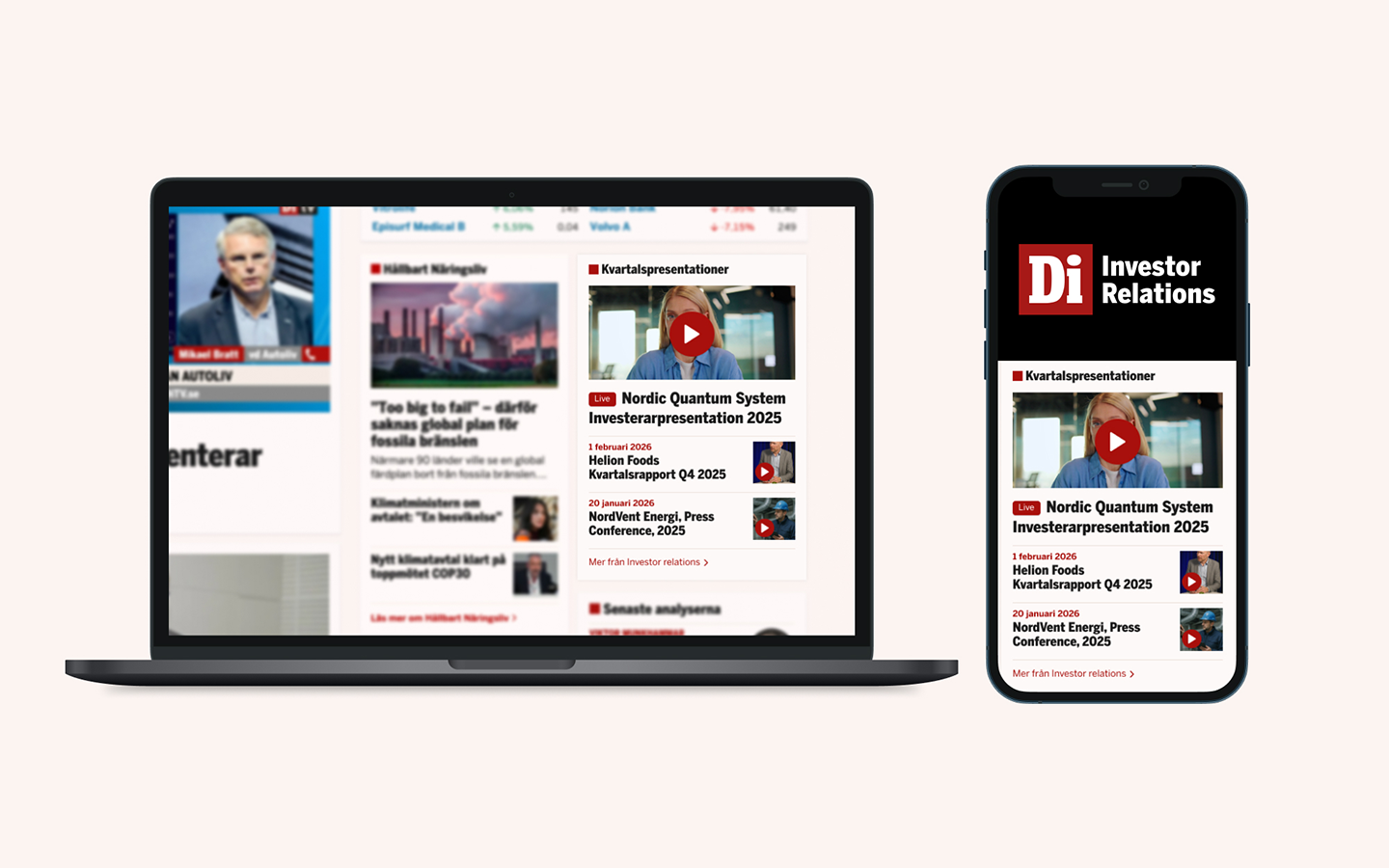
Three components on Di.se. A front-page widget labeled Kvartalspresentationer showing the latest videos. A dedicated Kvartalspresentationer page for browsing every video across every participating company. A per-company video component on each brand page, showing that company's most recent video alongside its financial data.
From the user's point of view, this is one product: a company holds a broadcast, and it appears where its audience is already looking. Behind the surfaces, five products do coordinated work.
Operator view in the Live Manager.
Live meeting platform with presenter module.
Widgets live on di.se
Form creator flow.
What happened after we shipped
Adoption. Roughly fifteen listed companies have implemented the service since launch. Thirty-five videos are live on Di.se, and the archive grows each earnings season.
Visibility gains. Companies using the pipeline report visibility increases of up to 700 percent over their previous solutions. Combining a video format with Di.se's reach is doing what the pitch predicted.
Interest from beyond Sweden. Nordic companies outside Sweden have started asking about the service, with several listed on the Helsinki exchange particularly interested. The pipeline was built for the Nordic market, and the early demand confirms that scope.
The meeting software beyond this project. It was built for Bonnier, but designed to serve other use cases. It now runs my company's client webinars and other broadcast scenarios.
Learnings
Cross-team projects have to be cross-team from the start. The biggest source of pressure on this project was that Bonnier's team joined nine months in, with three or four months left to launch. Late ideas and problems surfaced right when we had the least time to absorb them. For a partnership like this in the future, I would insist on both teams being in the room from the first design meeting.
People who don't work with video don't intuit video. Bonnier's UX team is excellent, but they hadn't spent a career staring at 16:9 rectangles. Basic constraints (fixed aspect ratios, black bars, how a video reacts when its container changes shape) had to be explained and re-explained. Your own expertise should never be assumed to be common knowledge.
Live QA is not QA. Because of the deadline, we tested the pipeline on live broadcasts, in front of real audiences. The first few streams were hectic and required everyone at my company to pitch in as operators. It got us across the finish line, but future projects need real staging and dry-run broadcasts before the first live one.
Designing across a whole pipeline is more interesting than designing one screen. Getting to design both the tool that produces the video and every surface that displays the video, in service of one integrated outcome, teaches you to think about product surfaces as connected rather than isolated.
A tight deadline means deferring things you'd rather not. Setting up a broadcast means moving through several separate products in a specific order: creating the live media, adding metadata, inviting speakers, creating forms. It's a manual sequence, and in v1 it lives across those separate products rather than in one flow. We accepted that friction because my company was operating every broadcast ourselves in the early days. Version 2 will collapse those steps into a single creation wizard so customers can eventually run their own broadcasts.